
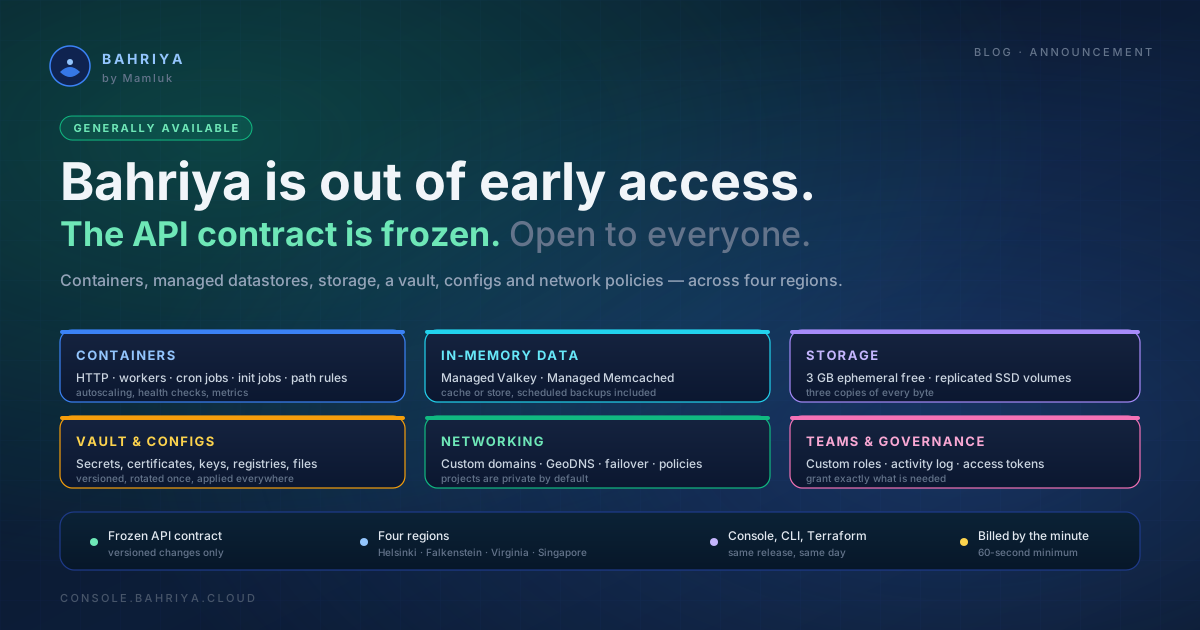
Bahriya is generally available
Bahriya is out of early access and open to everyone. The API contract is frozen, the console is stable, and here is everything you can build on today.
Bahriya is out of early access. As of today the platform is generally available to everyone — no invitation, no waiting list, no badge on the console.
We opened early access in May with containers, Memcached, a CLI and an API. Since then the platform has grown a managed datastore, persistent storage, a vault, a configuration system, network policies, role-based access control and a Terraform provider — most of it shaped by what early access users told us was missing. That period is over. What follows is what changes today, and what you can build on now.
What general availability actually changes
When we wrote about what early access meant on Bahriya, we made two promises about the day we left it. Both land today.
The API contract is frozen. During early access the API was allowed to break — fields renamed, endpoints split, required fields made optional. That freedom ends here. From today, removing or renaming a field, changing a type, changing a status code or retiring an endpoint means a new version and a coordinated migration, announced in advance. New optional fields and new endpoints are still fair game, because those break nobody.
The console stops moving under your feet. Sections will still improve, but whole-layout rewrites are behind us. Deep links you have bookmarked, and the entity URLs you may have put in internal runbooks, are stable.
The practical upshot: you can pin the Reis CLI and the Terraform provider in your own pipelines and trust that an upgrade is a routine bump rather than a migration. The runtime underneath — the part that actually runs your containers — has been production-grade throughout, and nothing about it changes today.
What you can run
Containers, in three shapes
Bring any OCI-compliant image and Bahriya runs it. HTTP containers serve traffic, with a hostname, TLS, health checks and autoscaling out of the box. Worker containers run continuously without serving traffic — queue consumers, background processors, anything that just needs to stay up. Cron jobs run on a schedule and are billed only for the seconds they execute. The containers documentation covers all three, and the workers and cron jobs announcement covers the two newer ones in depth.
Around them sits the machinery you would otherwise assemble yourself. Init jobs run migrations before your main process starts, at no extra charge. Path rules apply caching, authentication or rate limits to individual routes rather than the whole container. Basic authentication and IP rules protect a container without a line of application code. Prometheus metrics bring your own instrumentation into the console.
Two managed in-memory datastores
Memcached has been there since day one — project-private, sized to your workload, with eviction you control and connection details that amount to a hostname and a port.
Valkey joined in August. It is the open-source continuation of Redis under the Linux Foundation, and your existing Redis client connects to it unchanged. Instances are created as a cache or a store, and the platform treats that distinction seriously: caches evict, stores persist to disk and back themselves up on a schedule you set, with the last seven days retained at no charge. Three topologies — single, high-availability and sharded — cover the range from a session cache to a primary datastore. The Managed Valkey announcement has the full picture.
Storage that survives a restart
Every container gets 3 GB of ephemeral storage free — the scratch space you would have written to /tmp on a server. For state you cannot afford to lose, persistent volumes attach at whatever path your image expects, and every byte is kept in three independent copies. The stateful containers announcement covers the design and the trade-off between the two.
A vault, and configuration as a first-class resource
Credentials and configuration are organisation-level resources on Bahriya, versioned independently of the containers that consume them. Rotate a certificate once and every project using it picks up the change.
The vault holds secrets, TLS bundles, X.509 certificates, SSH and GPG keypairs, encryption keys and private registry credentials. Configs cover env files, JSON, YAML and plain text, mounted into your containers as files. The Vault and Configs announcement explains the model and why it is organisation-scoped rather than per-container.
Networking you can reason about
Every container gets a hostname and a certificate automatically. Beyond that you can bring your own domain, choose round-robin or geographic DNS, and enable failover so an unhealthy region drops out of rotation on its own. In front of an HTTP container, proxy caching serves repeat requests at the edge without touching your application.
Projects are private by default. Network policies are how you open exactly the connections you need: ingress from named peer projects, egress to specific IP ranges, and — at the application layer — egress to specific domains. They are written once at the organisation level and attached wherever they apply.
Teams, roles and accountability
An organisation is the billing and ownership boundary. Inside it, roles are yours to define — you build them out of individual grants rather than picking from a fixed list, and you can share a single resource with someone who should not have the whole role. Alongside that: team invitations, an activity log recording who changed what and when, personal access tokens for automation, and ownership transfer for when the person who created the account moves on.
Four regions, and the choice of how to use them
Bahriya runs in Helsinki, Falkenstein, Virginia and Singapore. A container can run in one region or all four, and multi-region deployment is a checkbox rather than a project. The regions documentation covers latency, cost and where your data actually sits.
Three ways to drive it, one contract underneath
Everything above is available in the console, on the command line, and as code — the same release, the same day, every time.
The Reis CLI is a single binary with a flag mode for one-off commands and a YAML mode for declaring a whole stack in a file. The Terraform provider covers every resource type on the platform, with a complete worked example that stands up a project, a registry, secrets, containers and a datastore in one apply. The provider announcement has the background.
Both read the same public API, and the API is the contract — which, from today, is the frozen one.
Billing without surprises
Billing is per minute, per region, with a 60-second minimum. You pay for the CPU and memory your containers actually reserve while they are running, and nothing for replicas the autoscaler has scaled away. Vault items, configs and network policies use a small two-rate model — one rate while the item exists, one while it is attached — with no charge for rotations or rollbacks.
The pricing calculator will give you a figure before you provision anything, alongside itemised comparisons against AWS, Azure and Google Cloud for the same workload.
Support
Support now lives in the console. Open a ticket from your organisation, attach the project, container or region it concerns, and it reaches us with the context already filled in. The troubleshooting section of the knowledgebase covers the common symptoms — containers that will not start, image pull failures, certificate errors — and is usually faster than waiting for us.
What is next
Leaving early access is not the end of the roadmap. Still ahead:
- Managed MySQL — a relational database with automated backups, in the same shape as Valkey.
- CouchDB — a globally distributed, multi-region document database.
- S3-compatible object storage — for files, media and backups.
We will announce each here as it lands, with documentation and full CLI and Terraform coverage on the same day. That has been the rule since early access and it does not change.
Start here
If you are new, deploy your first container — it takes about ten minutes. If you would rather start from your own stack, the quickstarts cover Node, Next.js, Django, FastAPI, Laravel, Rails, Go, static sites and any Docker image. If you are already running somewhere else, there are step-by-step migration guides from Heroku, Fly.io, Render, Railway and Docker Compose, and honest comparisons if you are still deciding.
Create an account at console.bahriya.cloud, or write to us at hello@bahriya.cloud.
Thank you to everyone who spent the last few months telling us what was wrong. The platform is considerably better for it.
From the knowledgebase
Getting Started
What is Bahriya?
Getting Started
Deploy Your First Container
Quickstarts
Deploy your framework on Bahriya
Containers
Containers
Valkey
Valkey
Memcached
Memcached
Vault
What is the Vault?
Networking
Network Policies
Regions
Regions
Billing
How Billing Works
Migrating to Bahriya
Migrating to Bahriya
Comparisons
Choosing a container platform