
The Vault and Configs are here — and they're the runway for what comes next
The Vault and Configs land on Bahriya: versioned, rotatable homes for TLS bundles, keys, secrets and config files, attached at the project level.
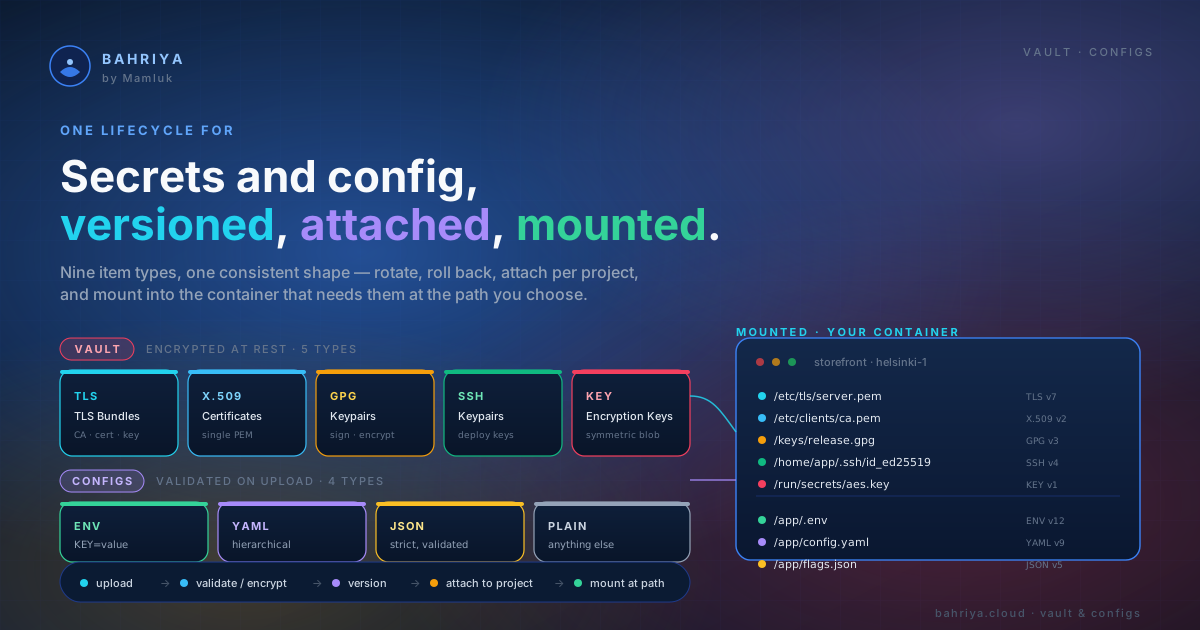
Two new subsystems land on the platform today, and together they change the shape of what you can build on Bahriya. The Vault is the new home for every piece of sensitive material a container needs to do its job. Configs is the matching home for every piece of non-sensitive material — the config files your app reads at boot.
Both are versioned, both are attached at the project level, and both are wired into your containers with the same model you already know.
This release is also the groundwork. Before we ship managed Valkey, MySQL, Postgres, CouchDB and the rest of the data tier, we needed a serious answer for the things those services depend on — TLS material, certificate authorities, signing keys, encryption keys, backup credentials, configuration files. That answer is the Vault and Configs.
What's in the Vault
The Vault is one place to store, version, and rotate seven kinds of material your containers care about:
- TLS Bundles — CA certificate, server certificate and private key as one unit, for HTTPS termination, mTLS, and internal service TLS.
- x509 Certificates — a single certificate on its own, for client certificates and signing certificates.
- GPG Keypairs — public and private key plus optional passphrase, for package signing and encrypted backups.
- SSH Keypairs — public and private key, for deploy keys and git access.
- Encryption Keys — raw cryptographic key material, mount-only, for application-level encryption and disk encryption.
- Registries — username and password for a private OCI image registry. Registries are now a Vault type. Everything you created before this release is still there — same handles, same attachments, same containers — just under a new roof.
- Secrets — a single encrypted value, injected into a container as an environment variable. Secrets are now a Vault type too. Again, nothing to migrate — your existing secrets carried over with their handles intact.
Pulling registries and secrets into the Vault matters because it gives every sensitive thing on the platform the same shape: create it once in your organisation, attach it to the projects that need it, wire it into the containers that consume it, and rotate it without redeploying.
Every Vault item is versioned
Rotation has been the missing piece. A new version becomes the current one with a single action — your container picks it up on its next start, and the previous five versions are kept for instant rollback. No re-uploading the same file with a -v2 suffix, no manual cleanup, no losing the trail of who rotated what and when.
For TLS bundles, x509 certificates and GPG keypairs, Bahriya parses what you upload and surfaces the metadata for you — subject, issuer, expiry, fingerprint, algorithm. You stop guessing whether the cert you uploaded six months ago is the one about to expire.
Materialised where your container needs it
How a Vault item shows up inside your container depends on what it is. TLS bundles, x509 certificates, GPG keypairs, SSH keypairs and encryption keys mount as files at a path you choose. Registries are used by the platform to pull your image. Secrets become environment variables. The model is consistent: you wire the item to the container once, and Bahriya keeps the contents in sync as you rotate.
And alongside it — Configs
Configs is the non-sensitive sibling. Four types, same lifecycle:
- Env Files — a list of
KEY=VALUEvariables, validated on upload, injected as environment variables at runtime. The natural step up from typing env vars into the container form one at a time. - YAML Configs — a YAML file, validated on upload, mounted as a file inside your container at the path you choose.
- JSON Configs — same thing, for JSON.
- Plain Configs — any other text format your application reads —
nginx.conf,redis.conf, anapplication.properties, whatever.
Like the Vault, every config is versioned. Like the Vault, you attach configs at the project level and wire them into specific containers. Unlike the Vault, the content is not sensitive — it's shown back in the console, the API and the CLI in plaintext (it's still encrypted at rest, because defence in depth is cheap).
Inline environment variables on a container form stay free — they are not going anywhere. Env files are a separate, billable type because they're a reusable, version-managed resource shared across containers. Use whichever fits.
Why we built this now
You can run a single container on Bahriya without ever opening the Vault. The reason we needed to ship both subsystems before the next wave of managed services is that the next wave does not work without them.
A managed Postgres is not just a process running on a node. It's a process that needs:
- A TLS bundle for client connections — and a way to rotate that bundle without reissuing every connection string.
- An encryption key for backups at rest — and somewhere to keep prior versions for restoring older snapshots.
- A GPG key for signing those backup artifacts before they leave the cluster.
- An SSH key for streaming replication into a customer-managed read replica.
- A config file for the tuning knobs you actually want to expose —
shared_buffers,work_mem, the few dozen things a serious operator will adjust.
Multiply that by Valkey, MySQL, Postgres and CouchDB, and you start to see the problem. We could have built a parallel little secret-and-config store inside each managed service, copy-pasted four times. We chose not to. Every future managed service will attach to the same Vault items and the same Configs you use for your own containers. One model, one place to rotate things, one audit trail.
It also means the doors that the Vault opens are not only for the data tier. Mutual TLS between your own services. Code-signed releases out of your CI. Customer-supplied client certificates. Per-environment GPG keys for an encrypted backup pipeline you build yourself. The platform now ships the primitives — what you stack on top of them is up to you.
Where to find it
Vault and Configs are live in the console under your organisation today. Everything is also available in the API, the Reis CLI, and the Terraform provider — same release, same day, all three.
If you already had registries and secrets in your organisation, they're already in the Vault. No migration to run, no handles to update, no broken containers. We did the lift.
Start with What is the Vault? and Env Files for the lay of the land, then jump to the per-type articles for the resource you actually need.
And keep an eye on this space — the first of the managed databases lands next.
From the knowledgebase