
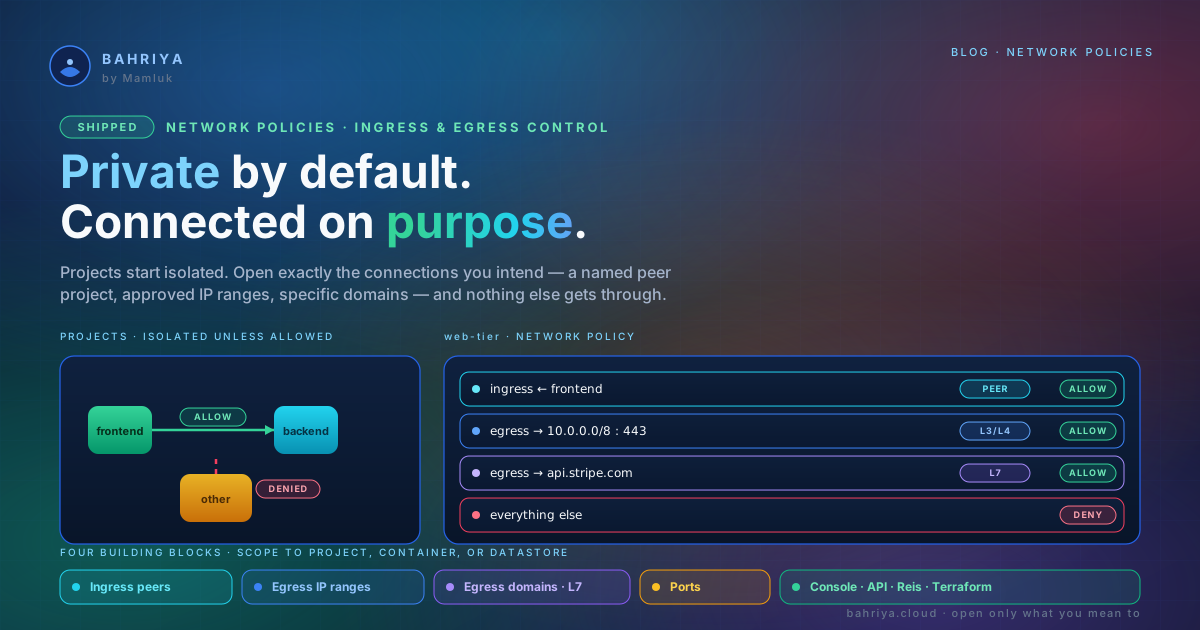
Network policies — private by default, connected on purpose
Network policies arrive on Bahriya: projects stay private by default while you allow exactly the peer projects, IP ranges, domains and ports you intend.
Every project you run on Bahriya starts out on its own island. Workloads in one project can't reach workloads in another, and nothing from outside a project can reach in. That's a good default — but real applications aren't islands. Your frontend needs to talk to your backend. A worker needs to reach a payment provider. A reporting job needs your data warehouse and nothing else.
Until now, "open the connection you need" and "keep everything else shut" weren't really things you could express. Network policies change that. You write down the connections you want to allow — a specific peer project, an approved range of IP addresses, a named set of domains — and Bahriya permits exactly those and denies the rest.
Allow rules, never surprises
A network policy is a small, readable set of allow rules layered on top of the private baseline. There are four kinds of rule, and you mix whichever you need:
- Ingress peers — the other projects in your organisation that may reach the workloads this policy protects. Link
frontendtobackendwithout opening either to anything else. - Egress IP ranges — the outbound IP ranges your workloads may send traffic to. Adding any range flips outbound traffic to deny-by-default; only the ranges you list get out.
- Egress domains — the domains your workloads may reach, matched by name rather than by a block of addresses that drifts over time.
api.stripe.com, your warehouse, an approved partner API. - Ports — narrow any of the above to specific ports and protocols. Allow a peer only your API port; allow an outbound range only on 443.
Rules only ever add permitted connections. There's no way for a policy to quietly widen access you didn't write down — if it isn't in the policy, it isn't allowed.
Addresses, or names
Two of those rules work on addresses and ports; one works on domain names. That distinction matters more than it looks.
Allowing outbound traffic by IP range is fine when you control the other end. But when you're allowing traffic to a third-party service, its IP addresses change without telling you — and an allow-list of addresses quietly rots into either "too open" or "broken". Allowing by domain sidesteps that entirely: you say api.stripe.com, and that's what's permitted, whatever addresses sit behind it this week.
This is application-layer control, and it's the right tool for locking a workload's outbound traffic down to a short list of services it's actually allowed to call.
Scope it exactly where it belongs
The same policy can guard a lot or a little. You choose when you attach it:
- A whole project — the policy applies to every container and datastore in it, including ones you deploy later. Ideal for guardrails that should always hold: "this project may only talk to these two others."
- A single container — give just one workload its own outbound allowances or ingress peers, without touching the rest of the project. Perfect for the one service that reaches an external API.
- A datastore — control precisely which workloads may connect to a managed datastore, so it answers to its owning app and nothing else.
Because policies live at the organisation level, you write one once — a "web tier" policy, an "approved egress" policy — and attach it wherever it belongs. Change it in one place and every attachment follows.
A few shapes we expect you'll reach for
Link a frontend to its backend. Two projects, private from everything else, but the frontend can reach the backend's API port. One policy, one peer, one port.
Pin a payments workload to its provider. A service that handles money should only ever reach your payment provider. Restrict its outbound traffic to a short list of domains, and a compromised dependency has nowhere to send data.
Lock a database to one app. Scope a policy to your managed datastore so only the application that owns it can connect — other projects, and other workloads in the same project, are refused at the network.
Enforce an egress allow-list org-wide. Attach an "approved egress" policy to a whole project and every current and future workload inherits the same outbound allow-list the moment it deploys.
How to use it
Create a policy under Resources → Networking → Network Policies in the console, then attach it — from a project's network-policies panel to cover the whole project, or from a container or datastore to scope it to that one workload. Detaching removes the rules from that workload while the policy stays in your inventory for reuse.
Everything you can do in the console you can do as code. The Reis CLI (reis network_policy:create, reis project:attach) and the bahriya_network_policy Terraform resource manage the full lifecycle — same release, same day.
Pricing
A small per-policy base rate applies while a policy exists in your organisation, and a per-region rate applies while it's attached to a project — the same two-rate model as vault items and configs. Egress domain rules do a little more work, so they add a per-container charge in each region the policy applies to; the plain IP, port, and peer rules don't, and datastores never carry the domain-rule charge. The pricing calculator has it built in, so you can see the shape before you ship.
Where to find it
Network policies are live now in the console, the API, the Reis CLI, and the Terraform provider. The full walkthrough — concepts, console workflow, and billing — is in the Network Policies KB article.
Start private. Open only what you mean to. Keep the rest shut.
From the knowledgebase