
Managed Valkey — the Redis you remember, minus the licence
Managed Valkey lands on Bahriya: the open-source continuation of Redis, with cache and store modes, three topologies, and drop-in support for Redis clients.
There's a datastore almost every application team reaches for at some point: something in-memory and fast, for the sessions, the queue, the counters, the cache in front of the database. For fifteen years the answer was Redis. Then Redis stopped being open source — and the community's answer to that was Valkey: a fork of Redis 7.2 under the Linux Foundation, backed by the industry's biggest cloud providers, and permanently under the permissive BSD 3-Clause licence.
Today we're launching managed Valkey on Bahriya. It's the datastore your Redis clients already speak — same protocol, same commands, same data structures — running next to your containers, managed like everything else on the platform.
Drop-in means drop-in
Your existing Redis client library connects to Valkey unchanged. Connection URLs, AUTH, Sentinel discovery, cluster redirects — all of it behaves the way your driver expects, because Valkey is that lineage, continued in the open. Migrating from a hosted Redis is a connection-string change, not a rewrite.
VALKEY_URL=redis://:<password>@session-cache:6379Containers in the same project reach an instance at its handle on port 6379. That's the whole integration.
Say what the data means
Every instance is created as a cache or a store — and the platform takes that seriously:
- A cache keeps data in memory only and, when memory fills, quietly drops the least recently used entries. Every write succeeds; cold data gives way. Perfect for sessions, query caches and computed results you can rebuild.
- A store persists to disk, refuses to evict by default, and can back itself up on a schedule — snapshots on a cron you control, the last seven days retained, free. That's the honest shape for job queues, counters and anything you'd mind losing.
Eviction stays fully tunable either way — eight policies, from noeviction to volatile-ttl, each explained in plain terms in the knowledgebase so you can decide what should give way when memory fills.
Pick your failure tolerance
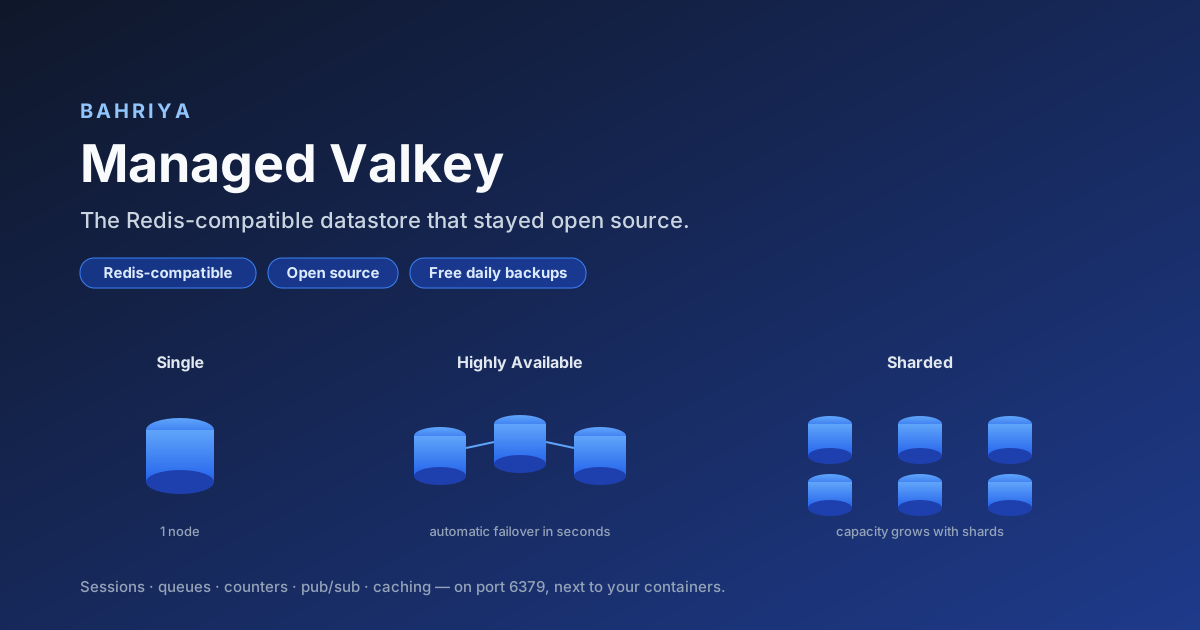
Three topologies, one decision: what happens when a node fails?
- Single — one node, the simplest and cheapest shape, for data you can rebuild.
- Highly Available — a replicated tier that detects a failed primary and promotes a replica automatically, within seconds. Choose 3 or 5 nodes for tighter tolerance.
- Sharded — a cluster that partitions your keyspace and grows capacity with shards, from 6 nodes upwards.
The console derives the node count and shows a live cost estimate as you configure — the tier changes your failure tolerance and which client mode your driver uses, and nothing else about your code.
Exposure you can't get wrong
Instances are private to their project by default. If you need to reach one from outside — an app hosted elsewhere, a migration, a data pipeline — external access is available on every tier, and it is TLS-only, authenticated and IP-allowlisted, always. All three are enforced by the platform; a configuration missing any of them is rejected. The infamous "open Redis on the internet" is not something you can build here, even by accident.
Certificates are managed for you: the platform issues a TLS bundle covering every name the instance answers to — including your own custom hostnames — and keeps it current as the instance changes. Prefer your own certificate? Bring a bundle from your vault.
Multi-region, honestly
Deploy an instance to several regions and each region runs an independent copy with its own data — the right shape for active-active applications, where every region's containers use their local instance at the same address. We'd rather give you region-local performance and a model you can reason about than a cross-region replication story with fine print.
Console, CLI, Terraform — from day one
Like every Bahriya resource, Valkey ships with its full management surface at launch: the console with guided provisioning and a live estimate, the Reis CLI in flag and YAML modes, and the Terraform provider for declarative stacks. The knowledgebase section covers topologies, connecting, eviction, persistence, backups and external access.
Available now
Valkey is available to every organisation. Create an instance, point your existing client at it, and keep your data on a datastore that answers to its community — not a licence change.
From the knowledgebase