
Access control, the way you actually work
Bahriya access control grows up: build custom roles, override access per project, share single resources, and transfer ownership with a two-party handshake.
Teams are not flat. The person who ships containers all day should not have to think about billing. The contractor helping on one project should not see the other nine. The teammate you trust with a single database should not need the keys to everything.
Today Bahriya's access control grows up to match. You can build your own roles, tune access per project, share a single resource with one person, and hand over ownership safely — all from the console, the API, the Reis CLI, and Terraform.
Roles you define
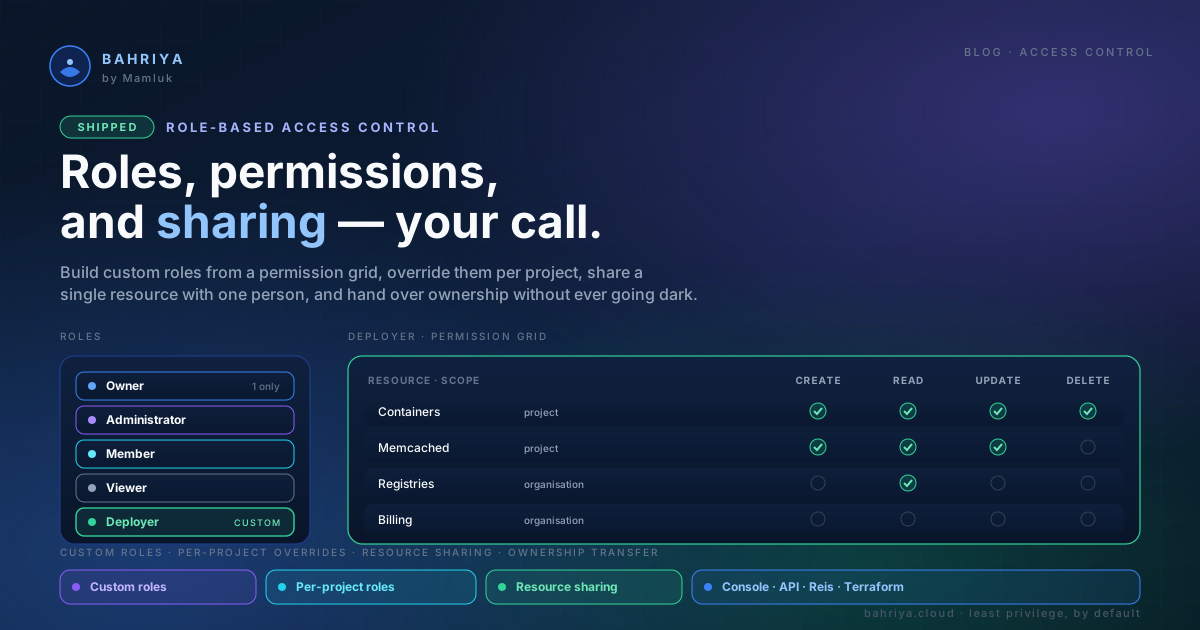
Every organisation still ships with four roles that cover the common cases:
- Owner — full control, including billing and ownership. One per organisation.
- Administrator — manage everything except ownership.
- Member — read and update, but not create or delete at the organisation level.
- Viewer — read-only.
When those are too broad, build your own. A custom role is a name plus a grid of permissions: for each kind of resource — containers, cron jobs, workers, Memcached, registries, secrets, vault items, configuration files, projects, members, billing — you choose which of create, read, update and delete it allows, and whether that applies across the whole organisation or inside a project.
Want a "Deployer" who can create, update and delete containers, read your registries, and touch nothing else? Three ticks and a save. The role applies the moment you assign it, and editing it updates everyone who holds it.
Different access in one project
A member's role is their baseline everywhere. But sometimes one project needs to be different — tighter, or looser.
Assign someone a project role and it replaces their organisation role for that project alone. Make a person a Viewer across the organisation, then give them full control of the one project they lead. Everywhere else, they stay a Viewer. Most-specific wins, and only where you say so.
Share a single resource
Roles grant access broadly. Sometimes you just want to hand one person one thing.
Sharing does exactly that: give a member access to a single container or a single registry without changing their role. It only ever adds access to that one resource — it never removes anything their role already allows, and it touches nothing else. Revoke it and you take back precisely what you gave, nothing more.
Handing over the keys, safely
Ownership is the one role you cannot simply reassign — an organisation must always have exactly one owner, and never accidentally zero.
So transferring it is a deliberate, two-party handshake. The current owner starts the transfer and picks who takes over and what role they will step down to. Both people confirm by email. Only when both have confirmed does ownership actually move — and the outgoing owner keeps full control until that moment. Start it by mistake? Cancel it, and nothing changed.
Everywhere you work
All of it is available from every surface, so your access model can live wherever the rest of your setup does.
In Terraform, roles are just resources:
resource "bahriya_role" "deployer" {
  name = "Deployer"

  permissions {
    level      = "project"
    resource   = "deployables_container_http"
    permission = "create"
  }
  permissions {
    level      = "organisation"
    resource   = "attachables_registries"
    permission = "read"
  }
}
From the Reis CLI, the same thing in one command — plus assignment and sharing:
reis role:create --name "Deployer" \
  -p project:deployables_container_http:create \
  -p organisation:attachables_registries:read

reis role:assign --user <user-id> --role deployer
reis share:create --user <user-id> \
  --resource-type deployables_container_http \
  --resource-id <container-id> --permission read
And everything the CLI and Terraform can do, the console does with a few clicks.
Least privilege, without the friction
Good access control usually means a trade: safety or convenience, pick one. The point of this release is that you shouldn't have to. Give people exactly what they need — no more, no less — and change your mind whenever the team does.
Start in User Management → Roles in the console, or read the roles and permissions guide to see the whole picture.
From the knowledgebase