
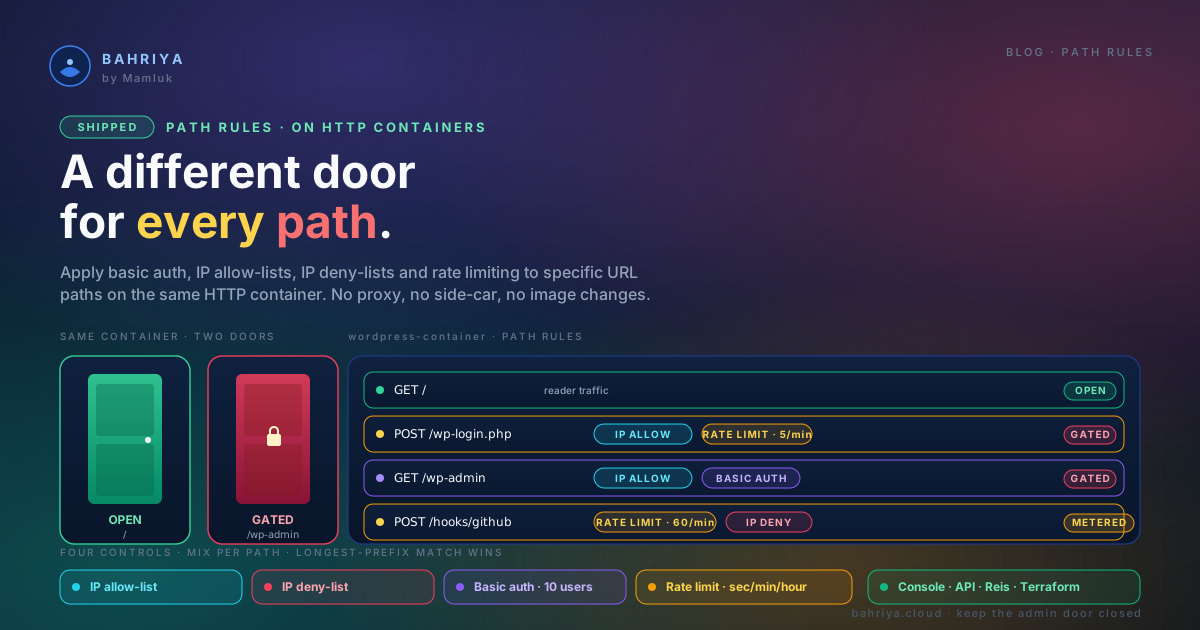
Path rules — take the admin door off the public internet
Path rules let you apply basic auth, IP lists and rate limiting to specific URL paths on a Bahriya HTTP container — different protections for the same app.
Most applications have two doors. The one your users walk through, and the one you walk through. The one for your users is meant to be open to the world; the one for you never was. But on a normal HTTP container both doors sit behind the same hostname, on the same port, protected by the same rules — because for a long time that was all the platform gave you.
Path rules change that. You can now apply basic authentication, IP allow-lists, IP deny-lists and rate limiting to specific URL paths on an HTTP container — different protections for different parts of the same app, no proxy in front, no side-car, no image changes.
The two most common examples we come across
WordPress. Every WordPress site on the public internet gets hammered on /wp-login.php and /wp-admin. It's the single most attacked pair of paths in existence. The rest of the site — the pages your readers actually want — should stay open. The two admin paths should not.
With path rules on your WordPress container:
- One rule on
/wp-login.phpand one on/wp-admin, both with an IP allow-list limited to your office, your VPN, and whichever residential IPs you and your editors use. - Optional basic authentication on top of the allow-list, so even someone on your network types a second password before WordPress's own login form shows up.
- Optional rate limiting on
/wp-login.phpat a handful of requests per minute per IP, so a mistake in the allow-list doesn't turn into an open door.
The public site still serves reader traffic normally. The login page — the one every bot on the internet is trying — stops answering to anyone who isn't you.
Keycloak (or any auth server you self-host). Same shape. Public endpoints like /realms/<realm>/protocol/openid-connect/token need to answer everyone. The admin console at /admin and the management API at /admin/realms/* should not. A path rule on /admin with an IP allow-list keeps the operator surface off the internet without breaking the OIDC flow your applications depend on.
The pattern generalises. A phpMyAdmin under /db. A Grafana under /monitoring. A staging environment under /beta. A webhook receiver under /hooks/github that you want rate-limited independently of the rest of your API. Anywhere the same container serves paths with different threat models, path rules let you say so.
How it works
You configure path rules on the container's edit page, in the Path Rules section just below Security. Each rule is a small object:
- Path — the URL prefix the rule applies to (must start with
/). - Basic authentication — up to 10 username/password pairs. Passwords are stored encrypted and never shown back to you.
- IP allow-list and IP deny-list — comma-separated IPs and CIDR ranges.
- Rate limiting — per-second, per-minute and per-hour windows, applied per client IP.
- Priority — a tiebreaker for the rare case where two rules share a path length.
You can enable any combination — basic auth alone, allow-list alone, all four together. You need at least one enabled control for a rule to be saved.
For every request, Bahriya picks the rule whose path is the longest match for the URL. A rule on /wp-admin/network wins over a rule on /wp-admin for requests under /wp-admin/network. Where no rule matches, the container's top-level controls apply. Path rules replace the container-wide controls for the same control type on the matched path — there's no merging of thresholds, no accidental compounding.
What this replaces
Before today, the honest answer to "how do I block /wp-login.php from the public internet on Bahriya" was: put a second layer in front of your container, or roll your own middleware inside the app. Neither one is where you wanted to spend your afternoon.
Now it's a two-minute change on the container form. No new resource. No new hostname. No image rebuild.
Pricing
Each enabled control on a path rule bills at the same per-region rate as its container-wide equivalent. A container with basic auth on and three path rules each running basic auth pays for four instances of basic auth per region per hour. A container with rate limiting off but a single path rule with rate limiting on pays for one instance of rate limiting per region per hour.
No new SKUs, no new line items — the pricing calculator has dedicated inputs for path rules so you can see the shape before you ship.
Where to find it
Path rules live under the existing HTTP container form in the console, and are already available in the API, the Reis CLI, and the Terraform provider — same release, same day, all three.
The full walkthrough is in the Path Rules KB article. The two closest neighbours — Basic Authentication and Rate Limiting and IP Rules — are the container-wide versions of the same controls, in case you want protection everywhere and stronger protection on a handful of paths.
Ship well. Keep the admin door closed.
From the knowledgebase